Threads scheduler
Plan your Threads posts, carousels and reply chains ahead, and publish them through Meta's official Threads API. Post the same idea to Instagram, Bluesky and X in their own versions from one calendar.
Updated 14 November 2026
- Text posts up to 500 characters, single photos or videos, and carousels of up to 10.
- Reply chains: as many 500-character parts as you need, posted in order.
- Views, likes, replies, reposts and quotes for every post.
- Approved by Meta for publishing on 8 November 2026.
- $19 a month for 10 channels across 23 networks, 7 days free.
What you can schedule to Threads
| Post type | Limit in PandaQueue |
|---|---|
| Text | Up to 500 characters |
| Photo or video | One file, with the text as its caption |
| Carousel | Up to 10 photos and videos, mixed in any order |
| Reply chain | Replies of up to 500 characters and 10 photos or videos each |
| Statistics | Views, likes, replies, reposts and quotes |
How to schedule a Threads post
- Choose Connect a channel → Threads in PandaQueue and sign in on Threads' page.
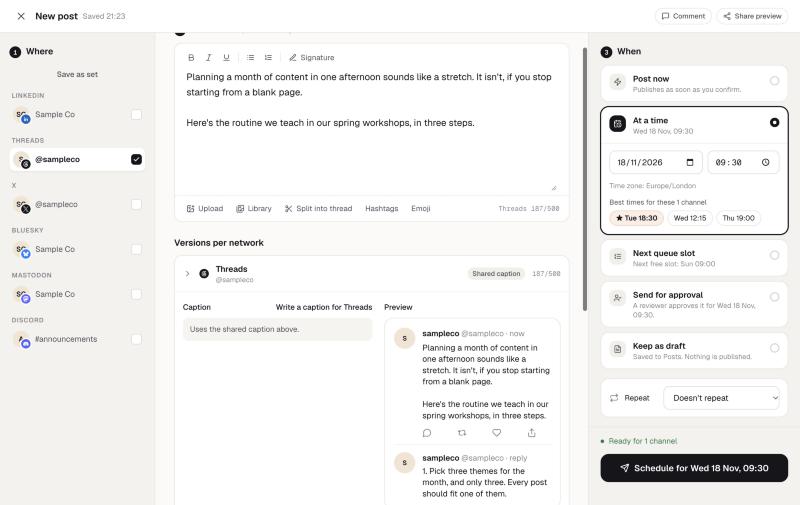
- Write the post. Attach media for a photo, video or carousel, or add replies underneath for a chain.
- Pick a time, or choose Next queue slot to use your next saved posting time for Threads.
The composer checks every part against the 500-character limit as you type, so a long chain doesn't break halfway through.
Threads with Instagram, Bluesky and X
Threads sits between Instagram and the text-first networks. A common setup: the image for Instagram's feed, a 500-character take with the same image for Threads, a 300-character version for Bluesky and 280 for X. Pick all four in one post and edit each version in its own tab; they all land on one calendar. Instagram needs a professional account linked to a Facebook Page; Threads doesn't.
Turning one long post into a thread
Write it out in full and choose Split into thread: AI breaks it into parts that fit 500 characters, at natural points and in your words, for you to adjust before scheduling. The same text can be split separately for Bluesky's 300 characters and X's 280.
From ChatGPT, Claude or code
PandaQueue's MCP server and REST API are on every plan. Ask Claude or ChatGPT to “post this as a Threads chain on Monday at 8” and it drafts and schedules it once you confirm. How to connect it.
See every network's limits on the networks page, or the Bluesky scheduler if you post to both.
Questions
How do I connect my Threads account?
Can I schedule a carousel on Threads?
Can I schedule a Threads thread (a chain of replies)?
What statistics do I get?
Is Threads scheduling included in every plan?
Try PandaQueue free for 7 days.
No card required. Connect your accounts in a minute and schedule your first week.
Start free