Bluesky scheduler
Schedule Bluesky posts and threads ahead of time, with images, video and alt text, and post the same update to Mastodon, Threads and X in their own versions. PandaQueue publishes through Bluesky's official API with an app password.
Updated 14 November 2026
- Posts up to 300 characters with 4 images or one video, and alt text.
- Threads: as many 300-character replies as you need, posted in order.
- Links, @mentions and #hashtags are made clickable automatically.
- Connect with an app password, never your main password. Self-hosted servers work too.
- $19 a month for 10 channels across 23 networks, 7 days free.
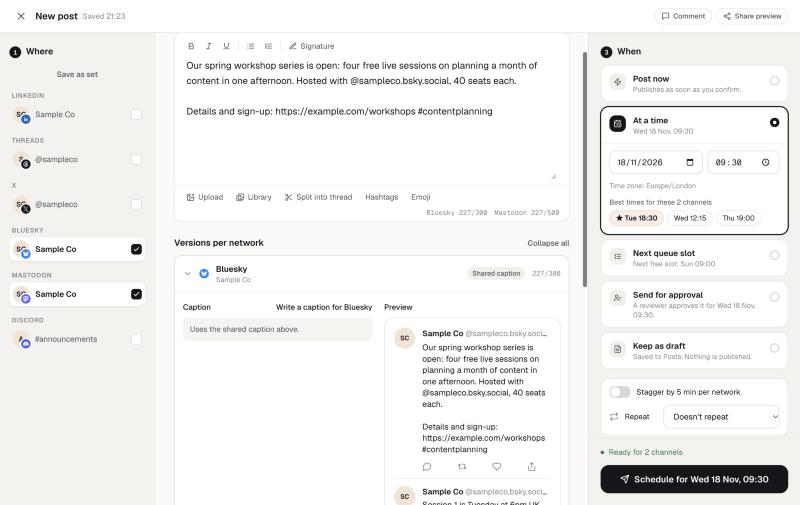
What you can schedule to Bluesky
| Limit in PandaQueue | |
|---|---|
| Text | 300 characters per post |
| Images | Up to 4, each under about 1 MB, with alt text |
| Video | One per post, under 50 MB, with alt text |
| Images and video together | No, Bluesky takes one or the other |
| Threads | Replies of up to 300 characters and 4 images or a video each |
| Statistics | Likes, reposts, replies and quotes per post |
The composer counts against the 300-character limit as you type, and tells you before scheduling if an image is too large, rather than letting the post fail when it's due.
Clickable links, mentions and hashtags
Bluesky doesn't detect links in plain text by itself: the app that sends a post has to mark each link, mention and hashtag (Bluesky calls these facets). Without them, URLs and @handles show up as plain text. PandaQueue looks up each mentioned handle and marks everything up when it publishes, so the post behaves exactly like one written in the Bluesky app.
How to schedule a Bluesky post
- In Bluesky, go to Settings → Privacy and security → App passwords and create one for PandaQueue.
- In PandaQueue, choose Connect a channel → Bluesky and enter your handle and the app password.
- Write your post. For a thread, add replies underneath; each is checked against the 300-character limit.
- Add alt text to each image, pick a time or choose Next queue slot, and schedule.
Bluesky alongside Mastodon, Threads and X
If you've moved some of your audience to Bluesky, you probably still post to X, Mastodon or Threads too. Pick them all in one post and edit each network's version in its own tab: 300 characters for Bluesky, 500 for Mastodon and Threads, 280 for X. A long post can be split into a thread for each network with Split into thread, which uses AI to break it at natural points without adding or dropping anything.
Scheduling from ChatGPT, Claude or code
Every plan includes PandaQueue's MCP server and REST API. Ask ChatGPT or Claude to “turn this blog post into a Bluesky thread for tomorrow at 9” and it drafts the parts within the limits and schedules them once you confirm. How to connect it.
See every network and its limits on the networks page, or read how PandaQueue compares with Postiz.
Questions
Do I have to give PandaQueue my Bluesky password?
Will links and @mentions be clickable?
Can I schedule a Bluesky thread?
What are the media limits?
Does it work with a self-hosted Bluesky server?
Can I see how my Bluesky posts did?
Try PandaQueue free for 7 days.
No card required. Connect your accounts in a minute and schedule your first week.
Start free