LinkedIn post scheduler
Write your LinkedIn post once, schedule it for when your network is reading, and send a shorter version to X, Threads and Bluesky in the same step. PandaQueue publishes it on time through LinkedIn's official API.
Updated 14 November 2026
- Personal LinkedIn profiles today. Company Pages are coming once LinkedIn approves PandaQueue's Community Management access.
- Posts up to 3,000 characters with up to 9 images, one video, or a PDF carousel made from your images.
- One post, a separate version per network, from one calendar. 23 networks in all.
- Schedule from the app, from ChatGPT and Claude, or through the REST API.
- $19 a month for 10 channels, unlimited posts, 7 days free with no card.
What you can schedule to LinkedIn
| Post type | Limits in PandaQueue |
|---|---|
| Text | Up to 3,000 characters. Line breaks and emoji are kept as you write them. |
| Images | Up to 9 images, shown as a grid. |
| Document (carousel) | Your images combined into one swipeable PDF, with the title you choose. |
| Video | One video per post. An attached image can be used as its thumbnail. |
| Images and video together | Not possible: LinkedIn takes one kind of media per post. |
The composer counts characters against LinkedIn's limit as you type and warns you before scheduling if something won't fit, so a post doesn't fail at 9am while you're in a meeting.
How to schedule a LinkedIn post
- Create a PandaQueue account and choose Connect a channel → LinkedIn. Sign in on LinkedIn's page and allow access.
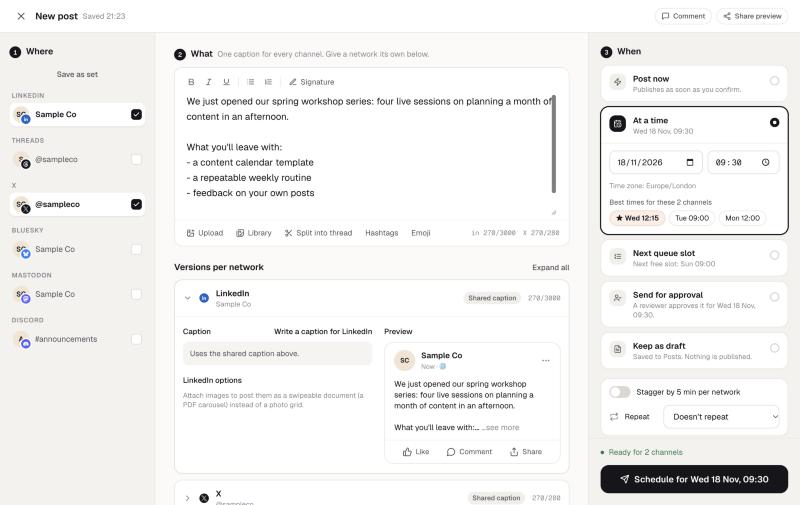
- Open the composer, pick your LinkedIn profile (and any other channels), and write the post.
- Switch to the LinkedIn tab to adjust that version only: add a hook line, post the images as a document, or change the media.
- Pick a date and time, or Next queue slot to use the next of your saved posting times for that channel.
Scheduled posts sit on the calendar, where you can drag them to another day, duplicate them, or send them back to draft.
One post, written for each network
A LinkedIn post rarely works unchanged on X. In PandaQueue, the main text is shared, and each network gets its own tab where you can rewrite it without touching the others: the full 3,000-character story for LinkedIn, a 280-character version for X, a 300-character one for Bluesky, and a thread for Threads. The AI rewrite can draft those shorter versions for you to edit.
LinkedIn's built-in scheduler or a scheduling tool?
LinkedIn can schedule a post from its own post box, and if you only ever post to one profile that may be all you need. A scheduler is worth it when:
- you post the same news to LinkedIn and other networks, and don't want to copy it into each app;
- you want one calendar showing everything that's planned, across people and channels;
- someone else writes the posts and you approve them first (Team and Agency plans);
- you'd rather ask ChatGPT or Claude to draft and schedule the week, or post from your own code.
What doesn't work yet
We'd rather you know before you sign up:
- Company Pages are waiting on LinkedIn's review. Profiles work today.
- First comments on LinkedIn need the same approval. They work on other networks.
- Profile analytics aren't available to any app: LinkedIn only shares statistics for Pages.
See every network PandaQueue supports, with limits, on the networks page, or compare PandaQueue with Buffer and Hootsuite.
Questions
Can I schedule posts to a LinkedIn company Page?
Can PandaQueue add a first comment to my LinkedIn post?
How do I make a LinkedIn carousel?
Do I get LinkedIn analytics for my profile?
Is LinkedIn's own scheduler enough?
Does PandaQueue need my LinkedIn password?
Try PandaQueue free for 7 days.
No card required. Connect your accounts in a minute and schedule your first week.
Start free