Schedule Discord messages and announcements
Plan your server's announcements, event reminders and weekly posts in advance. PandaQueue sends them to the right channels on time, through a webhook or its own bot, and can post the same update to X, Bluesky or Telegram at once.
Updated 14 November 2026
- Two ways to connect: a channel webhook (no bot, takes a minute) or PandaQueue's bot (more channel types).
- Text, announcement, forum and media channels.
- Messages up to 2,000 characters with up to 10 files, plus follow-up messages on webhook channels.
- One-off or repeating posts: daily, weekly, every two weeks or monthly.
- $19 a month for 10 channels across 23 networks, 7 days free.
Webhook or bot: which to use
| Channel webhook | PandaQueue bot | |
|---|---|---|
| Setup | Create a webhook in the channel's settings and paste the URL | Add the bot to a server you manage and pick its channels |
| Posts appear as | The name and avatar you give the webhook | The PandaQueue bot |
| Text channels | Yes | Yes |
| Announcement channels | Yes | Yes, and can publish to servers that follow the channel |
| Forum and media channels | No | Yes, as a new thread with a title |
| Follow-up messages | Yes | Not yet |
| Needs server admin rights | Manage Webhooks on that channel | Manage Server, to add the bot |
Webhooks are the quickest way in, and nothing joins your member list. Choose the bot if you post to forums, or want announcements pushed to the servers that follow your channel.
How to schedule a Discord message
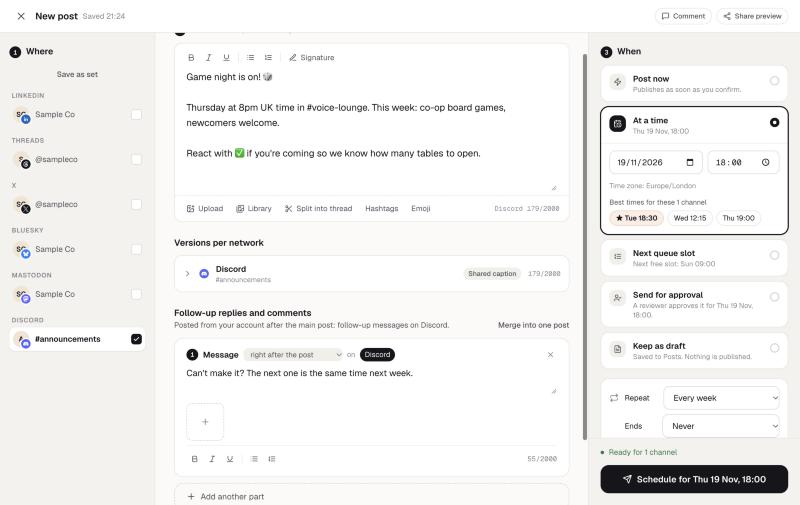
- In PandaQueue, choose Connect a channel → Discord, then either paste a webhook URL or add the bot to your server.
- Write the message in the composer. Attach images, a video or files (up to 10).
- On a webhook channel, add follow-up messages if the announcement needs more than 2,000 characters; they post straight after it.
- Pick a date and time, or make it repeat: every 1–6 days, weekly, every two weeks or monthly.
Repeating posts without a reminder bot
Weekly game nights, Monday stand-up prompts and monthly community calls are the usual reasons people install a reminder bot. In PandaQueue, any post can repeat, stop after a date or a number of posts, and each copy appears on the calendar with its own status, so you can change next week's message without touching the rest.
The same update everywhere your community is
Most communities don't live only on Discord. Pick your Discord channels alongside X, Bluesky, Telegram, Mastodon or Slack, and edit each network's version in its own tab: a longer Discord announcement with images, a 280-character post for X. Everything is on one calendar.
Discord's own scheduled messages
Discord has been testing scheduled messages with a limited group of users. We couldn't find an official announcement that it's rolled out to everyone as of November 2026. Where you have it, it's fine for a one-off message from your own account. PandaQueue covers what it doesn't: repeating posts, forum and announcement channels, a shared calendar for a team, and posting to other networks at the same time.
See all 23 networks and their limits on the networks page, or schedule Discord posts from ChatGPT and Claude.
Questions
Can you schedule messages in Discord without a bot?
Does Discord have its own scheduled messages?
Can I post to a Discord forum channel?
Can I schedule recurring Discord messages?
How many servers can I post to?
Try PandaQueue free for 7 days.
No card required. Connect your accounts in a minute and schedule your first week.
Start free